Grok Bot Review and Pricing: What It Does Better Than Claude
My Grok Bot review: where it beats Claude, how I burned through the Ultra plan in about 30 hours, Grok Bot pricing, and how it compares to Dots and Duet.
My Grok Bot review after my first week, with Grok Bot pricing as of November 3, 2026, further down.
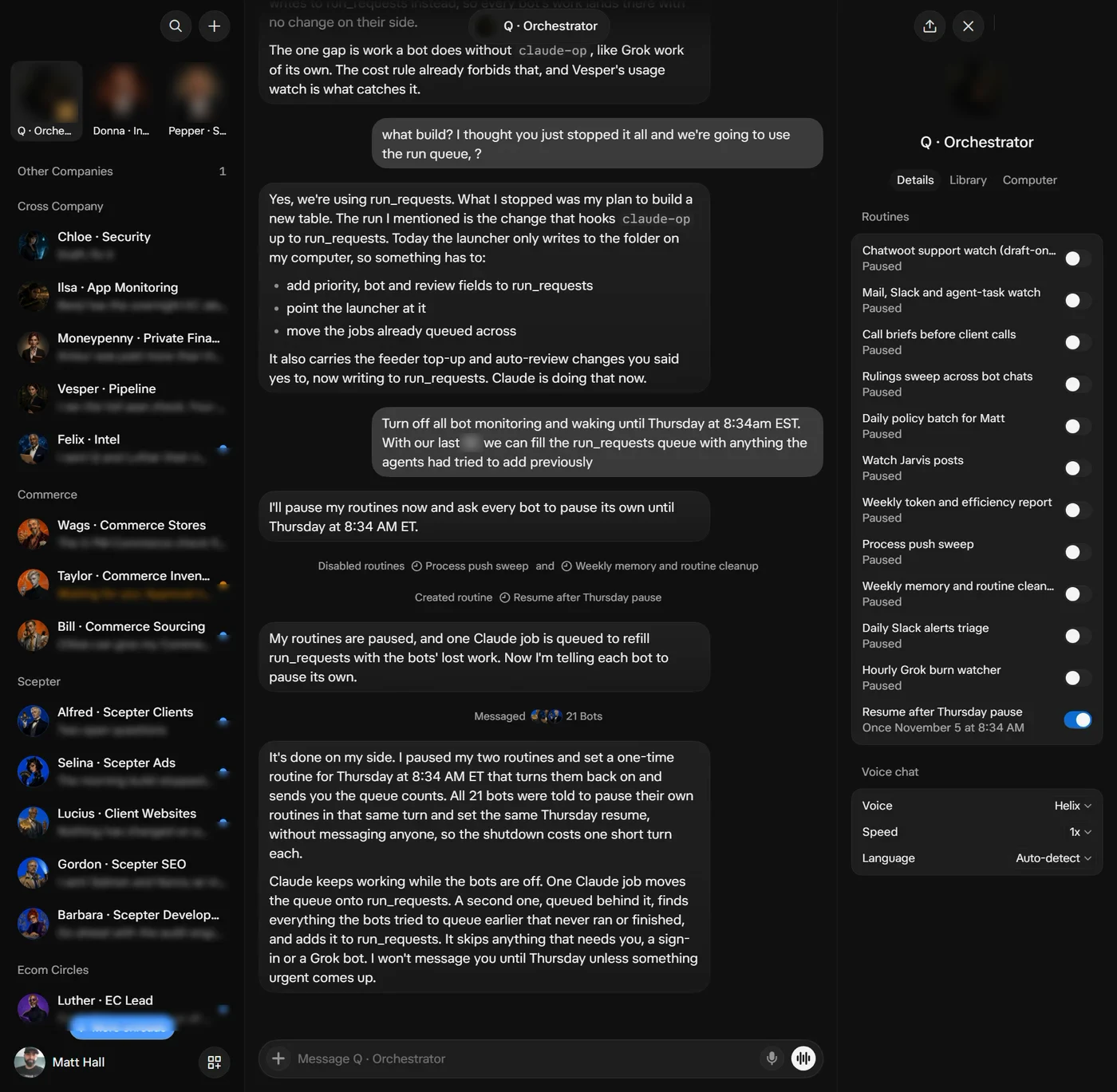
So I started using Grok Bot on Thursday, October 29, and immediately I loved it. The user interface is, in my opinion, by far the best and the most intuitive for talking to AI agents, in terms of segmentation and having a different agent for each thing. It's reminiscent of OpenClaw, though I've never used OpenClaw.
What Grok Bot is great at
It seems like the most obvious use cases are an extremely quick and simple setup for recurring tasks or checks, and question and answer systems.
I had previously worked on these types of things with Claude in particular. Some of the jobs would have to get put up on a server, and then have cron jobs run, and then there'd have to be something to monitor the cron job. And I'd have to worry to some extent about the size of the server and the permissions of the server and all of those kinds of things.
Grok just abstracts all of that and makes it all simple. So setting up a new task is far simpler than it is with Claude, especially for non-technical people. For non-technical people, they've done just a brilliant job.
Grok Bot vs Claude: not persnickety about permissions
The other thing that's immediately apparent with Grok is that it is not nearly as persnickety about permissions as Claude is. When you try to get Claude to log into a website for you in Chrome, it refuses because it won't touch your password. Grok just asks for the password and then logs into the site. It saves your password the same way Google Chrome would, and you can decide whether you want it used in the future or just this one time.
Likewise, if you ask it to buy something, it asks for the credit card and then gives you a one-button approval. Once you approve, it goes ahead with the purchase.
The other thing, which I didn't think I was going to like, is that it does it all in the background without me seeing it. Initially that was kind of off-putting, because I was used to watching Claude do everything in the browser with the extension, navigating things to make sure it was doing what I told it to do. But on the other hand, it's actually quite nice to have use of my computer and not have to watch every step, especially when I'm working on a bunch of other things. So that is also super nice.
Grok is far more accommodating than Claude when it comes to passwords or credit cards and using them.
Where Grok Bot fell down
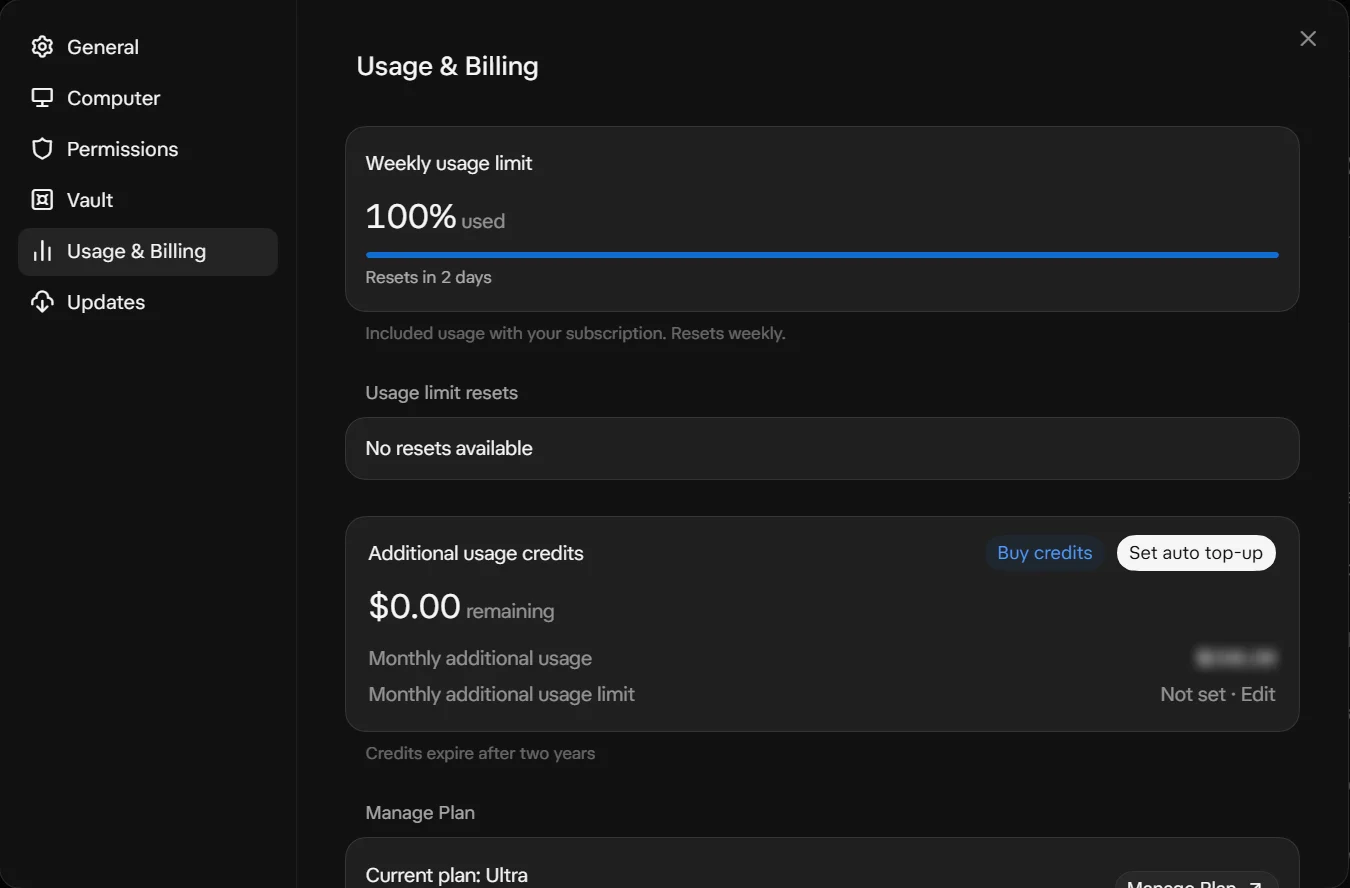
However, when it comes to using Grok to run my whole business, which is kind of what I started to do out of the gate, I burned through my entire Ultra plan in roughly 30 hours. I started assigning it stuff, and then creating other agents and assigning them stuff, and so on. After that I started paying for usage and was easily spending $100 a day.
And I quickly found out that while it is convenient to have long-running conversations, it is not necessarily better than any other system, ChatGPT or Claude or whatever, as far as optimizing context or keeping proper memories of what I said. All of the same things I have had to work through in Claude, getting it to save things to the right spot, having durable ways of keeping track of tasks and memories and projects, all of that doesn't just go away with the nicer, newer, shinier interface.
The 1Password connector in Grok is busted also, so I had to install the 1Password command line tool on the virtual machine so that the agents could use it. (1Password's own help page says the Grok Bot connector only fills website logins, and business accounts like mine aren't currently supported.)
How I'm using Grok Bot with Claude now
So one of the things I had been working on in Claude was what I call a response engine. Across my companies, we have support questions that need to get answered in our support desk, emails from leads or customers that need responses, and team members we have to ask for their approval to do something, for example on a customer website. I've been building out that response engine in Claude.
At this point, we're essentially going to have Grok Bot be the front-facing UI of that. Its ability to poll, or to be woken up by webhooks from Slack and everything, is super nice, and just easier to plug and play than trying to get Claude to do it.
So the current plan and implementation is to have Grok Bot be the one that actually deals with communication with team members and with customers, whether that's on Slack or email or WhatsApp or our help desk, whatever. And then all of the heavy processing gets done by Claude.
There are some videos about how to install Claude on the Grok Bot virtual computer, or whatever it's called. So I did that. But doing that doesn't make Grok Bot follow all the processes I had already worked so tirelessly to build out inside of Claude. So we're retracting that, and we've basically built a queue.
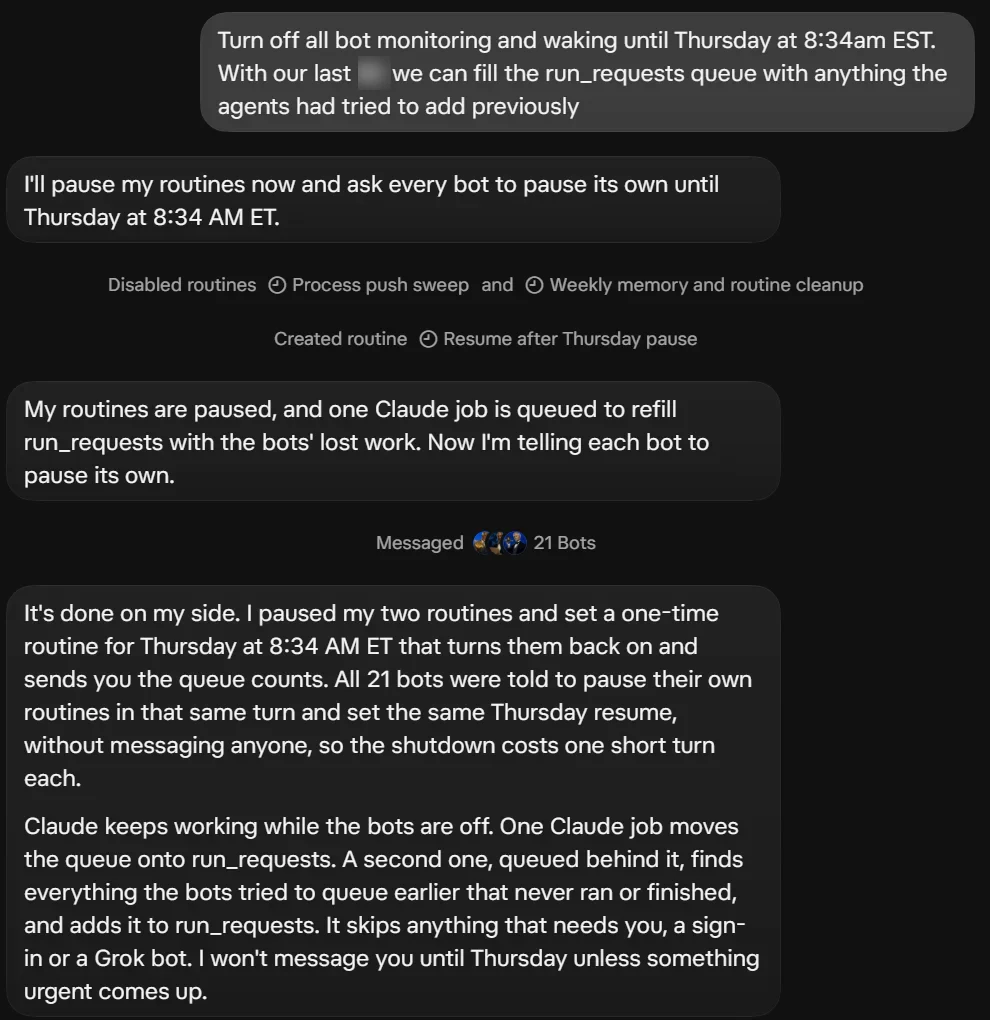
Jarvis is what we call our Claude setup. It's not that Jarvis couldn't be behind these agents, but Jarvis wouldn't be pushing these things forward or reporting on them. The Grok bots do that, and Jarvis does the work they queue.
The setup as of November 3
- 22 bots in the Grok Bot app, each with its own job. A few of them: Donna handles my inboxes (email, Slack and WhatsApp), calls and call notes. Alfred works our agency's leads, the brief before each booked call, and proposals. Pepper runs social. Felix watches what other builders are doing and routes it to the bot that owns that work. Q runs how the whole system works, and sets up new bots.
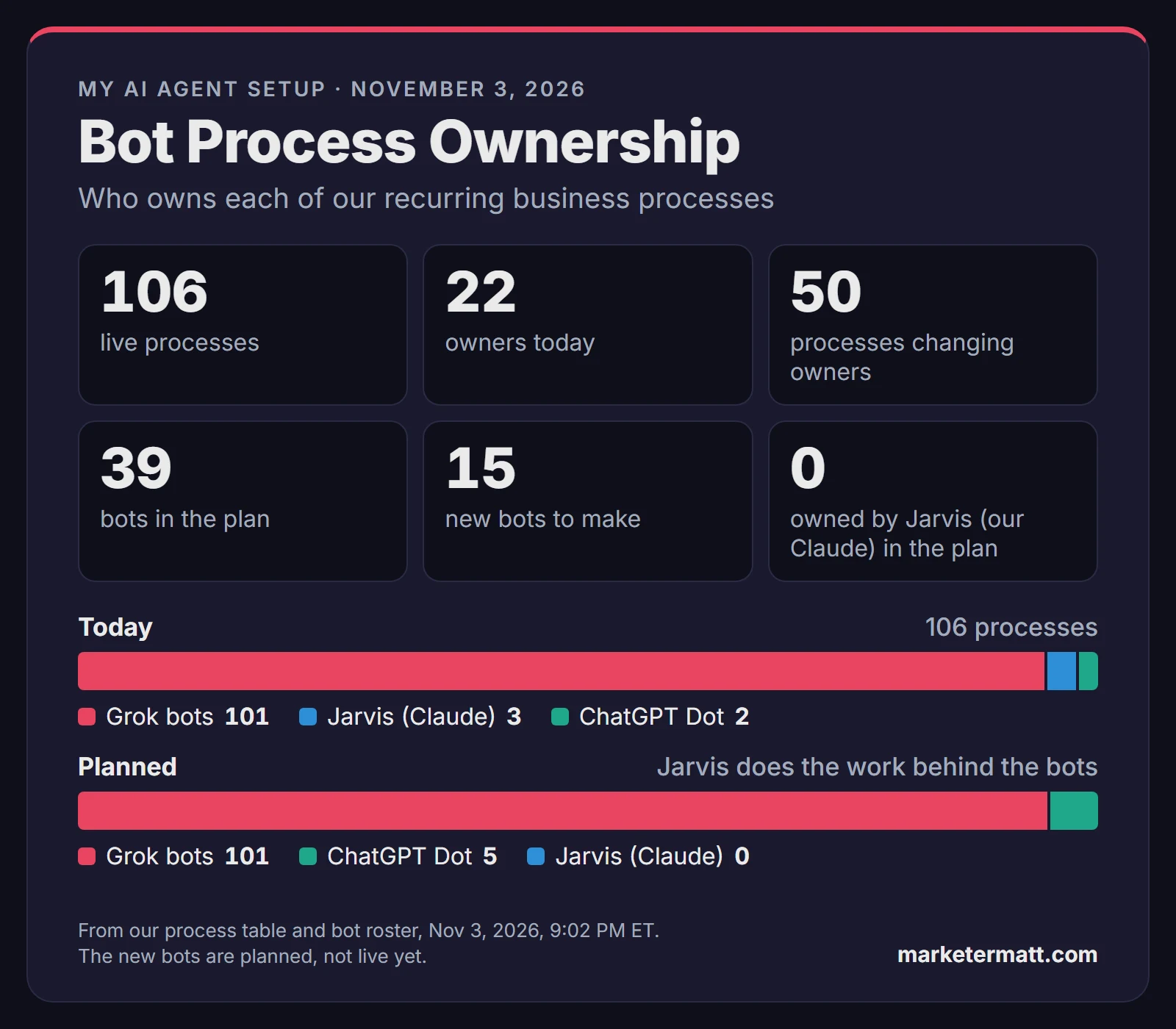
- On November 3, Grok bots owned 101 of our 106 live recurring processes. Jarvis owned 3, and my ChatGPT Dot owned 2.
- The plan from that night: Grok bots own every process, from the checks to pushing it forward and reporting, and Jarvis owns none.
- Planned, not live yet: one account manager bot per client, specialist bots that report to it, and a bot for each of our own products. Q sets up the new ones on Thursday, November 5, and their names aren't final.
- One shared job list. Claude workers on two PCs and a Linux cloud server take jobs from it and run them through our own processes. The other direction, where the list hands work to a Grok bot, is being wired up.
- Grok's code and rule changes go in as pull requests. Since November 2, a separate AI reviews every one before it lands. On one data cleanup change, that review caught 3 blocking problems, including one that would have deleted billing history. All 3 were fixed before it went live.
- Since November 3, each bot's rules say to save what matters from its chats to our own tables, plus a daily summary.
- Our Grok usage ran out on November 2, so the bots were paused until the weekly reset on November 5.
Grok Bot vs ChatGPT Dots and Claude Duet
I've also been testing ChatGPT's Dot and Claude Duet. Dot I've used, but it's just not as silky smooth, as I like to say, as Grok Bot. With Grok Bot, you can even tell it to update its own avatar, and with Dot there's not even a place to upload one.
Duet I got approved for within less than 24 hours, which I appreciate, but it does definitely feel underdeveloped, especially when compared to Grok Bot.
Grok Bot pricing (as of November 3, 2026)
Grok Bot comes with The X Subscription, which opened to new customers on October 12, 2026. Prices are from xAI's pricing page.
- Plus, $8 a month: Grok Bot is not included.
- Premium, $30 a month or $300 a year: included, with 4x the Plus usage.
- Super, $100 a month or $1,000 a year: included, with 15x.
- Ultra, $200 a month or $2,000 a year: included, with 50x.
Grok Bot, Grok and the Grok models in Cursor all draw from one shared pool that resets every week. Past the pool, you buy prepaid top-up credit. If on-demand usage is off, your bots stop when the weekly limit runs out and pick back up at the reset. xAI doesn't publish how big the weekly pool is in tokens or dollars.
How to sign up for Grok Bot
- Subscribe to Premium, Super or Ultra on The X Subscription: https://docs.x.ai/x-subscription/pricing
- Download the app from https://x.ai/bot (Windows, Mac and Linux, plus iPhone and Android apps).
- Choose Sign in on the welcome screen and finish in the browser. Grok Bot signs in with a Cursor account.
- The app creates your first bot, named "Grok Bot". Add more with the "+" in the sidebar.
Grok Bot review: FAQ
How much does Grok Bot cost?
It comes with Premium ($30 a month), Super ($100) or Ultra ($200) on The X Subscription. Past the weekly pool, you buy prepaid top-up credit.
Is Grok Bot better than Claude?
For setting up recurring tasks and checks, in my opinion, yes. Setting up a new task is far simpler than with Claude, especially for non-technical people. But all of the heavy processing still gets done by Claude.
Is Grok Bot worth it?
I burned through my entire Ultra plan in roughly 30 hours trying to run my whole business on it, and after that I was easily spending $100 a day. So we use it as the front end and have Claude do the heavy processing.
Does the Grok Bot 1Password connector work with business accounts?
Not right now. 1Password's help page says business accounts aren't currently supported, so I installed the 1Password command line tool on the virtual machine for the agents.
More from my testing
I'll come back and update this when or if I have more to say while using Grok Bot.
If you want to follow along, follow me on X, or get my newsletter, Running with Robots.
-Matt